Backing up and restoring Azure SQL Database is different than IaaS.
Backups are generated automatically for Azure SQL Database. A full backup is created once a week, a differential every 12 hours, and transaction log backups every 5 – 10 minutes. All backups are located in read-access, geo-redundant (RA-GRS) blobs replicated to a datacentre that is paired based on Azure rules. That means backups are safe from an outage in a single data centre.
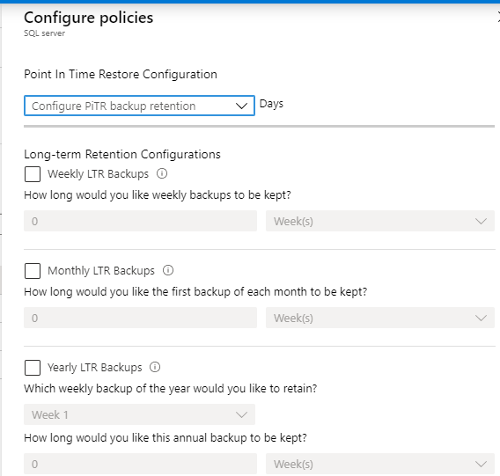
Backup policies can be configured per database as shown in the image below. Azure SQL Database can assist you to be compliant with mandatory backups for regulatory purposes with retention policies.
If the server containing the database is deleted, all backups will be deleted at the same time and there is no way to recover them. If the server is not deleted but the database is, the database can be restored normally.
Both Azure SQL Database and Azure SQL Database Managed Instance have a feature called Accelerated Database Recovery (ADR). Its purpose is to decrease the time it takes to deal with long running transactions so they do not impact the recovery time. Although ADR was developed for Azure and was originally an Azure-based feature, ADR was implemented in SQL Server 2019 as well.
Backups generated for Azure SQL Database cannot be used with Azure SQL Database Managed Instance or any version of SQL Server.
Database backup and restore for Azure SQL Database Managed Instance
By default, Azure creates backups for databases in Azure SQL Database Managed Instance and functions like Azure SQL Database.
You can also manually back up and restore databases with Azure SQL Database Managed Instance using the same backup to URL/restore from URL functionality found in SQL Server covered earlier. That requires the use of credentials to access Azure Blob Storage.
There is one major difference: for full backups, you can only generate a COPY_ONLY backup since Azure SQL Database Managed Instance is maintaining the log chain.
Backups generated by Azure SQL Database Managed Instance cannot be used to restore a database on SQL Server or Azure SQL Database.
Database backup and restore for Azure Database for MySQL
Backups of the data files and transaction log are automatically created for Azure Database for MySQL in either locally- or geo-redundant storage. The backups are encrypted with a default retention of seven days, and a maximum of 35. One nice thing about the backups is that there is no cost; if a server is provisioned with 100 GB of storage, you get the equivalent amount of backup space included with what you are already paying. If backup storage exceeds the 100 GB, there will be a charge.
Restores can be done either to a point in time or as a geo-restore, which recovers the database in another region if geo-redundant storage was configured.
Similar to Azure SQL Database and Azure SQL Database Managed Instance, these backups can only be used by Azure Database for MySQL and not a standard installation of MySQL.
Database backup and restore for Azure Database for PostgreSQL
The backup and restore situation for Azure Database for PostgreSQL is similar to that of MySQL. Backups occur automatically and both data files and the transaction log are backed up. The retention and encryption are the same as are the options for local- or geo-redundancy, cost, and restore options. The only difference is that depending on the supported maximum storage size, Azure will create full and differential backups (maximum of 4 TB) or snapshot backups (up to 16 TB).
Similar to all other Azure PaaS offerings, these backups can only be used by Azure Database for PostgreSQL and not a standard installation of PostgreSQL.
https://docs.microsoft.com/en-us/sql/azure-data-studio/tutorial-backup-restore-sql-server?view=sql-server-ver15