Correct option:
Configure CloudFront with multiple origins to serve both static and dynamic content at low latency to global users
Amazon CloudFront is a web service that speeds up distribution of your static and dynamic web content, such as .html, .css, .js, and image files, to your users. CloudFront delivers your content through a worldwide network of data centers called edge locations. When a user requests content that you're serving with CloudFront, the request is routed to the edge location that provides the lowest latency (time delay), so that content is delivered with the best possible performance.
You can configure a single CloudFront web distribution to serve different types of requests from multiple origins.
Steps to configure CLoudFront for multiple origins:
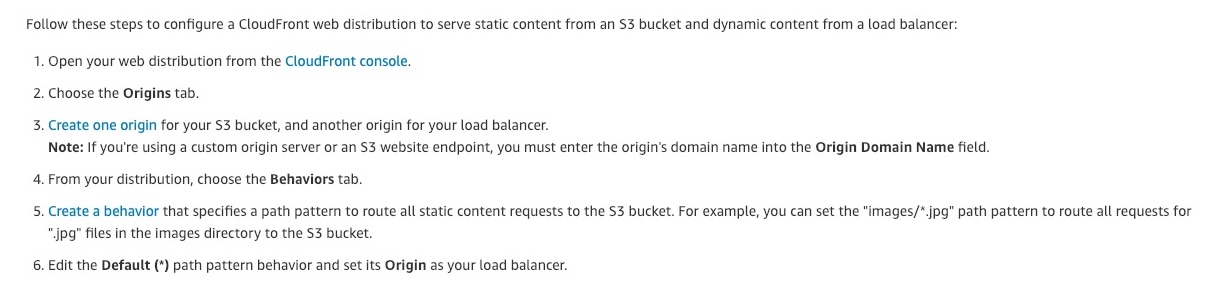
via - https://aws.amazon.com/premiumsupport/knowledge-center/cloudfront-distribution-serve-content/
Incorrect options:
Use CloudFront's Lambda@Edge feature to server data from S3 buckets and load balancer programmatically on-the-fly - AWS Lambda@Edge is a general-purpose serverless compute feature that supports a wide range of computing needs and customizations. Lambda@Edge is best suited for computationally intensive operations. This is not relevant for the given use case.
Use Global Accelerator to transparently switch between S3 bucket and load balancer for different data needs - AWS Global Accelerator is a networking service that improves the performance of your users’ traffic by up to 60% using Amazon Web Services’ global network infrastructure.
With Global Accelerator, you are provided two global static public IPs that act as a fixed entry point to your application, improving availability. On the back end, add or remove your AWS application endpoints, such as Application Load Balancers, Network Load Balancers, EC2 Instances, and Elastic IPs without making user-facing changes. Global Accelerator automatically re-routes your traffic to your nearest healthy available endpoint to mitigate endpoint failure.
CloudFront improves performance for both cacheable content (such as images and videos) and dynamic content (such as API acceleration and dynamic site delivery). Global Accelerator is a good fit for non-HTTP use cases, such as gaming (UDP), IoT (MQTT), or Voice over IP, as well as for HTTP use cases that specifically require static IP addresses or deterministic, fast regional failover.
Global Accelerator is not relevant for the given use-case.
Use CloudFront's Origin Groups to group both static and dynamic requests into one request for further processing - You can set up CloudFront with origin failover for scenarios that require high availability. To get started, you create an Origin Group with two origins: a primary and a secondary. If the primary origin is unavailable or returns specific HTTP response status codes that indicate a failure, CloudFront automatically switches to the secondary origin. Origin Groups are for origin failure scenarios and not for request routing.
References:
https://docs.aws.amazon.com/AmazonCloudFront/latest/DeveloperGuide/distribution-overview.html
https://docs.aws.amazon.com/AmazonCloudFront/latest/DeveloperGuide/high_availability_origin_failover.html