Correct option:
Leverage the capabilities offered by ElastiCache for Redis with cluster mode enabled
You can use Amazon ElastiCache to accelerate your high volume application workloads by caching your data in-memory providing sub-millisecond data retrieval performance. When used in conjunction with any database including Amazon RDS or Amazon DynamoDB, ElastiCache can alleviate the pressure associated with heavy request loads, increase overall application performance and reduce costs associated with scaling for throughput on other databases.
Amazon ElastiCache makes it easy to deploy and manage a highly available and scalable in-memory data store in the cloud. Among the open source in-memory engines available for use with ElastiCache is Redis, which added powerful geospatial capabilities in its newer versions.
You can leverage ElastiCache for Redis with cluster mode enabled to enhance reliability and availability with little change to your existing workload. Cluster Mode comes with the primary benefit of horizontal scaling up and down of your Redis cluster, with almost zero impact on the performance of the cluster.
Enabling Cluster Mode provides a number of additional benefits in scaling your cluster. In short, it allows you to scale in or out the number of shards (horizontal scaling) versus scaling up or down the node type (vertical scaling). This means that Cluster Mode can scale to very large amounts of storage (potentially 100s of terabytes) across up to 90 shards, whereas a single node can only store as much data in memory as the instance type has capacity for.
Cluster Mode also allows for more flexibility when designing new workloads with unknown storage requirements or heavy write activity. In a read-heavy workload, one can scale a single shard by adding read replicas, up to five, but a write-heavy workload can benefit from additional write endpoints when cluster mode is enabled.
Geospatial on Amazon ElastiCache for Redis:
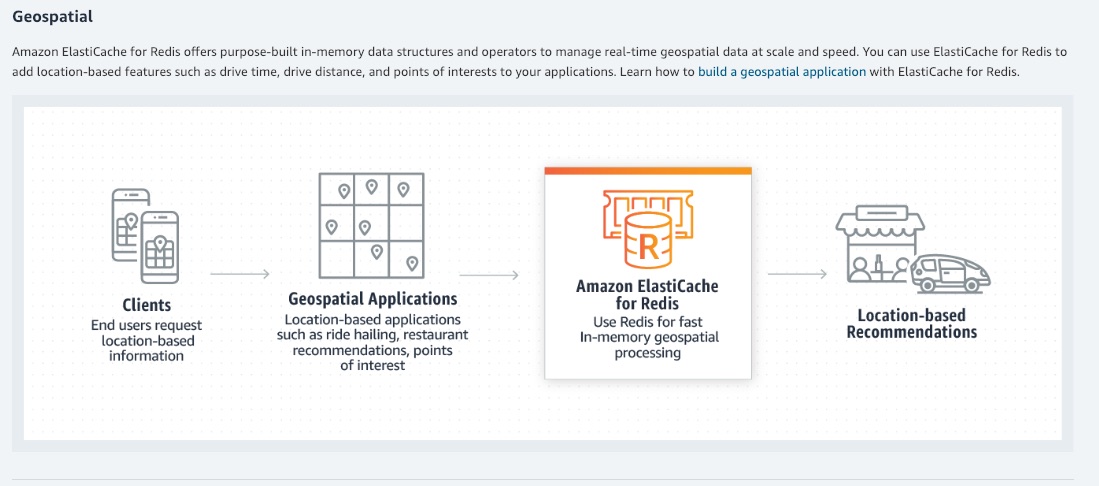
via - https://aws.amazon.com/blogs/database/work-with-cluster-mode-on-amazon-elasticache-for-redis/
Incorrect options:
Leverage the capabilities offered by ElastiCache for Redis with cluster mode disabled - For a production workload, you should consider using a configuration that includes replication to enhance the protection of your data. Also, only vertical scaling is possible when cluster mode is disabled. The use case mentions horizontal scaling as a requirement, hence disabling cluster mode is not an option.
Use CloudFront caching to cater to demands of increasing workloads - One of the purposes of using CloudFront is to reduce the number of requests that your origin server must respond to directly. With CloudFront caching, more objects are served from CloudFront edge locations, which are closer to your users. This reduces the load on your origin server and reduces latency. However, the use case mentions that in-memory caching is needed for enhancing the performance of the application. So, this option is incorrect.
Migrate to Amazon DynamoDB to utilize the automatically integrated DynamoDB Accelerator (DAX) along with query capability features - Amazon DynamoDB Accelerator (DAX) is a fully managed, highly available, in-memory cache for DynamoDB that delivers up to a 10x performance improvement – from milliseconds to microseconds – even at millions of requests per second. Database migration is a more elaborate effort compared to implementing and optimizing the caching layer.
References:
https://aws.amazon.com/blogs/database/work-with-cluster-mode-on-amazon-elasticache-for-redis/
https://aws.amazon.com/blogs/database/amazon-elasticache-utilizing-redis-geospatial-capabilities/