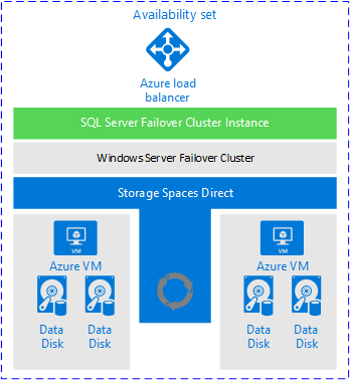
For all availability configurations of availability groups (AGs), an underlying cluster is required. There are many aspects of setting up a cluster that you need to be aware of.
Considerations for a Windows Server Failover Cluster in Azure
Deploying a Windows Server Failover Cluster (WSFC) in Azure is similar to configuring one on premises.
One of the most important aspects is deciding what to use for a witness resource. Witness is a core component of the quorum mechanism. Quorum is what helps ensure that everything in the WSFC stays up and running. If you lose quorum, the WSFC will go down taking an AG or FCI with it. The witness resource can be a disk, file share (SMB 2.0 or later), or cloud witness. It is recommended that you use a cloud witness as it is fully Azure-based, especially for solutions that will span multiple Azure regions or are hybrid. The cloud witness feature is available in Windows Server 2016 and later.
The next consideration is the Microsoft Distributed Transaction Coordinator (DTC or MSDTC). Some applications use it, but the majority of applications do not. If you require DTC and are deploying an AG or FCI, you should cluster DTC. Clustering DTC requires a shared disk to work properly even though you may not require one otherwise, as in the case of an AG.
Most WSFC deployments require the use of both AD DS and DNS; FCIs always do. AGs can be configured without requiring AD DS but still needing DNS. In Windows Server 2016, there is a variant of a WSFC called a Workgroup Cluster, which can be used with AGs only.
The WSFC itself needs a unique name in the domain (and DNS) and requires an object in AD DS called the cluster name object (CNO). Anything created in context of the WSFC that has a name will require a unique name, as well as at least one IP address. If the configuration will stay in a single region, IP addresses will be in a single subnet. If the WSFC will span multiple regions, more than one IP address will be associated with the WSFC, as well as an AG if it spans multiple regions as part of the WSFC.
A typical Azure-based WSFC will only require a single virtual network card (vNIC). Unlike the setup for an on-premises physical or virtual server, the IP address for the vNIC has to be configured in Azure, not in the VM. That means inside the VM it will show up as a dynamic (DHCP) address. This is expected, however cluster validation will generate a warning that can safely be ignored.
Considerations for the WSFC’s IP address is also different from on premises. There is no way to reserve the IP address at the Azure level since it is fully maintained within the guest configuration. This means that if subsequent resources that use an IP address in Azure use DHCP, you must check for conflicts.
https://azuremarketplace.microsoft.com/en-us/marketplace/apps/enterprise-ethereum-alliance.quorum-demo?tab=Overview