Azure offers several ways to automate processes. Azure Functions and Logic Apps are both Azure services that enable serverless workloads. Both services create workflows that are a collection of steps to execute complex tasks. For example, a Logic App can be created to populate a table in an Azure SQL Database when an entry is made in a SharePoint list.
For more complete control and granularity of your automation, Azure Automation allows for process automation, configuration management, full integration with Azure platform options (such as role-based access control and AAD) and can manage Azure and on-premises resources. One of the unique benefits of Azure Automation is that it can manage resources within Azure or on-premises VMs.
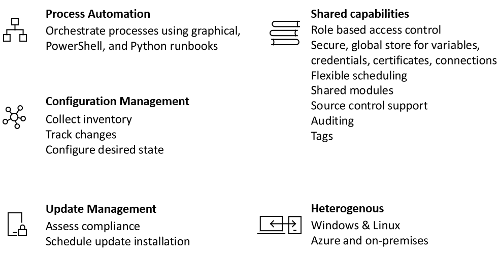
For example, if you have a VM that is normally kept in a down state for cost savings (except when it needs to be used), you have the ability within Azure Automation, using a feature called hybrid runbooks, to execute a script to start the VM, then kick off a SQL Server backup from within the VM, and finally shut down the VM.
Overview of Azure automation components
Azure Automation supports both automation and configuration management activities.
The components of Automation you will need to use to execute automated tasks are as follows:
Runbooks - Runbooks are the unit of execution in Azure automation. Runbooks can be defined as one of three types: a graphical runbook based on PowerShell, a PowerShell script, or Python script. PowerShell runbooks are most commonly used to manage Azure SQL resources.
Modules - Azure Automation defines an execution context for the PowerShell or Python code you are executing in your runbook. In order to execute your code, you need to import the supporting modules. For example, if you needed to run the Get-AzSqlDatabase PowerShell cmdlet, you would need to import the Az.SQL PowerShell module into your automation account.
Credentials - Credentials store sensitive information that runbooks or configurations can use at runtime.
Schedules - Schedules are linked to runbooks and trigger a runbook at a specific time.
https://docs.microsoft.com/en-us/azure/automation/automation-intro