For setting up Azure File Sync between an on-premises server (Server1) and an Azure file share, you need to perform the following two actions in the Azure subscription:
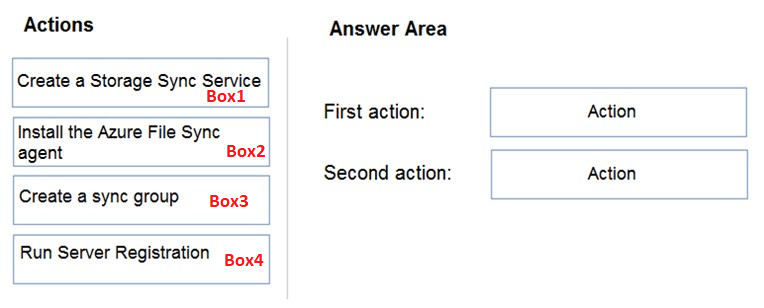
First action: Create a Storage Sync Service
Explanation: The Storage Sync Service acts as the central service in Azure to manage synchronization between the Azure file share and your on-premises server.
Second action: Create a sync group
Explanation: A sync group defines the sync relationship between the Azure file share and the on-premises server. It includes the configuration of which files and directories to synchronize.
Incorrect actions:
- Install the Azure File Sync agent: This is done on the on-premises server (Server1), not in the Azure subscription.
- Run Server Registration: This step is also performed on the on-premises server after installing the agent, to register it with the Azure Storage Sync Service.
Example for clarification: Think of the Storage Sync Service as the "control center" in the cloud, and the sync group as the specific "job" you want to configure for syncing files. Installing the agent and registering the server are tasks to be done locally, like connecting a computer to a network after setting up the network infrastructure.
=> B is correct.