You have an Azure subscription that contains the resources shown in the following table.
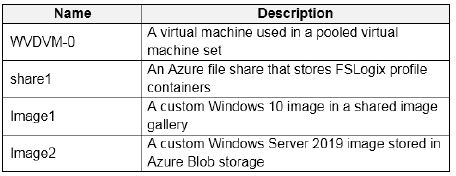
Which resources can you back up by using Azure Backup?
The latest changes and updates from the administration for this exam.
Latest Update: Jun 09 2026
All questions are working fine.
You have an Azure subscription that contains the resources shown in the following table.
Which resources can you back up by using Azure Backup?
HOTSPOT -
You create an Azure Virtual Desktop host pool as shown in the following exhibit.
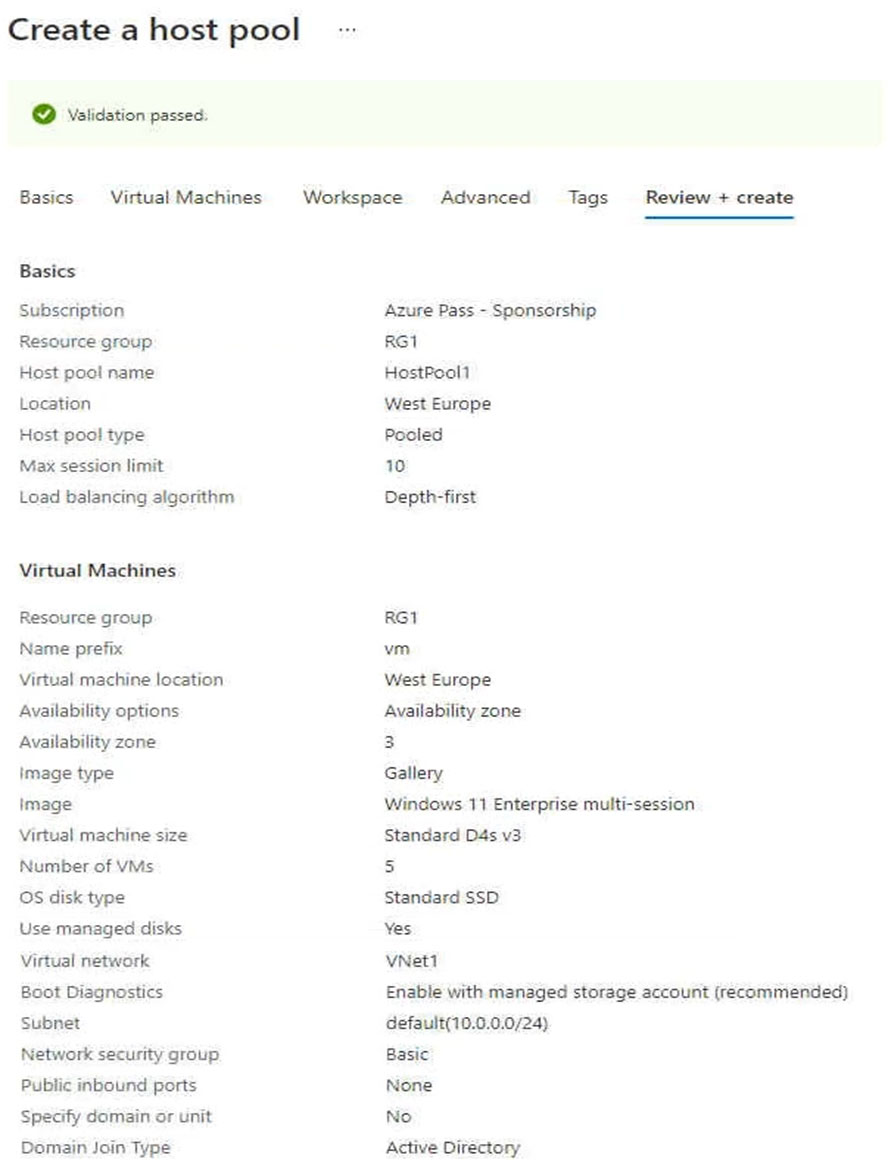
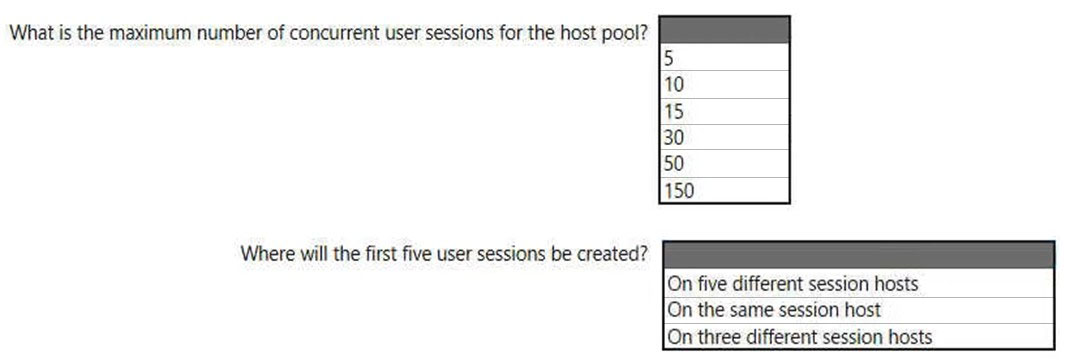
Use the drop-down menus to select the answer choice that answers each question based on the information presented in the graphic.
NOTE: Each correct selection is worth one point.
Hot Area:
Note: This question is part of a series of questions that present the same scenario. Each question in the series contains a unique solution that might meet the stated goals. Some question sets might have more than one correct solution, while others might not have a correct solution.
After you answer a question in this section, you will NOT be able to return to it. As a result, these questions will not appear in the review screen.
You have an Azure Virtual Desktop host pool that runs Windows 10 Enterprise multi-session.
User sessions are load-balanced between the session hosts. Idle session timeout is 30 minutes.
You plan to shut down a session host named Host1 to perform routine maintenance.
You need to prevent new user sessions to Host1 without disconnecting active user sessions.
Solution: From the host pool, you remove Host1 from the session host list.
Does this meet the goal?
Note: This question is part of a series of questions that present the same scenario. Each question in the series contains a unique solution that might meet the stated goals. Some question sets might have more than one correct solution, while others might not have a correct solution.
After you answer a question in this section, you will NOT be able to return to it. As a result, these questions will not appear in the review screen.
You have the following:
✑ A Microsoft 365 E5 tenant
✑ An on-premises Active Directory domain
✑ A hybrid Azure Active Directory (Azure AD) tenant
✑ An Azure Active Directory Domain Services (Azure AD DS) managed domain
An Azure Virtual Desktop deployment
The Azure Virtual Desktop deployment contains personal desktops that are hybrid joined to the on-premises domain and enrolled in Microsoft Intune.
You need to configure the security settings for the Microsoft Edge browsers on the personal desktops.
Solution: You configure a compliance policy in Intune.
Does this meet the goal?
You have an Azure Virtual Desktop deployment and the users shown in the following table.
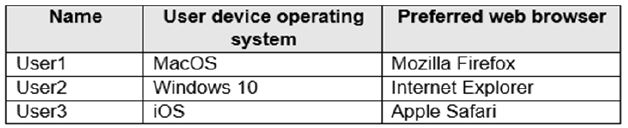
All the users plan to use a web browser to access Azure Virtual Desktop resources.
Which users can connect to Azure Virtual Desktop by using their preferred browser?
Note: This question is part of a series of questions that present the same scenario. Each question in the series contains a unique solution that might meet the stated goals. Some question sets might have more than one correct solution, while others might not have a correct solution.
After you answer a question in this section, you will NOT be able to return to it. As a result, these questions will not appear in the review screen.
You have an Azure Virtual Desktop host pool that runs Windows 10 Enterprise multi-session.
User sessions are load-balanced between the session hosts. Idle session timeout is 30 minutes.
You plan to shut down a session host named Host1 to perform routine maintenance.
You need to prevent new user sessions to Host1 without disconnecting active user sessions.
Solution: From the properties of the virtual machine of Host1, you enable just-in-time (JIT) VM access.
Does this meet the goal?
Your network contains an on-premises Active Directory domain named contoso.com that syncs to an Azure Active Directory (Azure AD) tenant.
You have an Azure Virtual Desktop host pool named Pool1 that has the following settings:
* Host pool name: Pool1
* Host pool type: Personal
* Number of VMs: 3
The session hosts have the following configurations:
* Image used to create the virtual machines: Windows 10 Enterprise8
* Virtual machines domain-joined to: On-premises contoso.com domain
You need to ensure that you can use Microsoft EndPoint Manager to manage security updates on the session hosts.
What should you do?
You have an Azure Virtual Desktop host pool in the East US region.
You need to implement a disaster recovery solution that meets the following requirements:
✑ If users cannot connect to the Azure Virtual Desktop resources in the East US region, the users must be able to connect to the equivalent resources in the
West US region.
✑ Users must connect to the Azure Virtual Desktop resources in either the East US or the West US region by selecting a single icon in the Remote
Desktop client✑ In the event of a disaster, failover between the Azure regions must be initiated manually by an administrator.
✑ Failover times must be minimized.
What should you do?
Select all that apply
You have an Azure Virtual Desktop host pool in the US East Azure region.
You need to ensure that the host pool can fail over to the US West Azure region.
What should you do first?
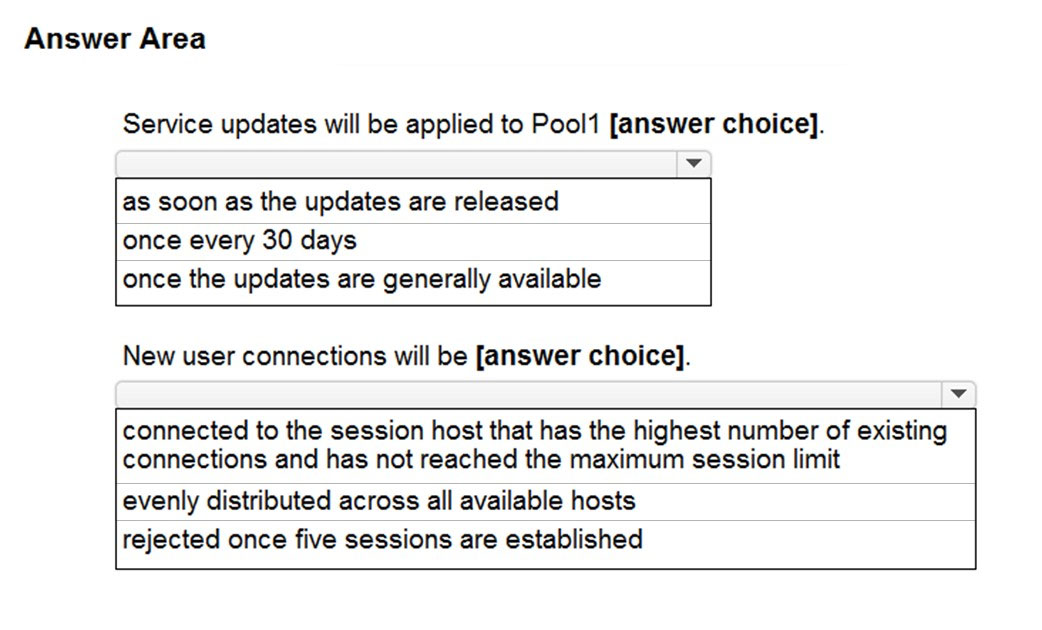
HOTSPOT -
You have an Azure Virtual Desktop deployment that contains a host pool named Pool1. Pool1 contains two session hosts.
Pool1 is configured as shown in the following exhibit.
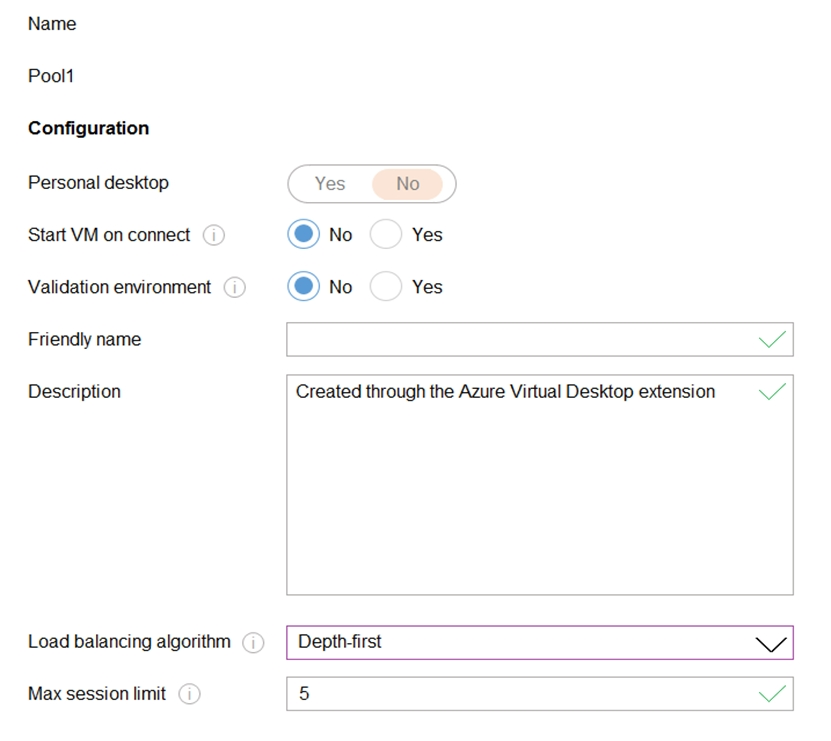
Use the drop-down menus to select the answer choice that completes each statement based on the information presented in the graphic.
NOTE: Each correct selection is worth one point.
Hot Area: