
You have an Azure Virtual Desktop host pool named Pool1 that contains three session hosts. The session hosts are configured to use FSLogix profile containers.
You need to configure Cloud Cache on the session hosts.
What should you do?
The latest changes and updates from the administration for this exam.
Latest Update: Jun 09 2026
All questions are working fine.
You have an Azure Virtual Desktop host pool named Pool1 that contains three session hosts. The session hosts are configured to use FSLogix profile containers.
You need to configure Cloud Cache on the session hosts.
What should you do?
Note: This question is part of a series of questions that present the same scenario. Each question in the series contains a unique solution that might meet the stated goals. Some question sets might have more than one correct solution, while others might not have a correct solution.
After you answer a question in this section, you will NOT be able to return to it. As a result, these questions will not appear in the review screen.
You have the following:
✑ A Microsoft 365 E5 tenant
✑ An on-premises Active Directory domain
✑ A hybrid Azure Active Directory (Azure AD) tenant
✑ An Azure Active Directory Domain Services (Azure AD DS) managed domain
✑ An Azure Virtual Desktop deployment
The Azure Virtual Desktop deployment contains personal desktops that are hybrid joined to the on-premises domain and enrolled in Microsoft Intune.
You need to configure the security settings for the Microsoft Edge browsers on the personal desktops.
Solution: You configure a Group Policy Object (GPO) in the Azure AD DS managed domain.
Does this meet the goal?
HOTSPOT -
You have a hybrid Azure Active Directory (Azure AD) tenant named contoso.com that contains the users shown in the following table.
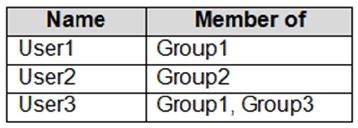
You have an Azure Virtual Desktop host pool. All the session hosts have a folder named C:\Folder1.
You create an FSLogix Application Masking rule as shown in the following exhibit.
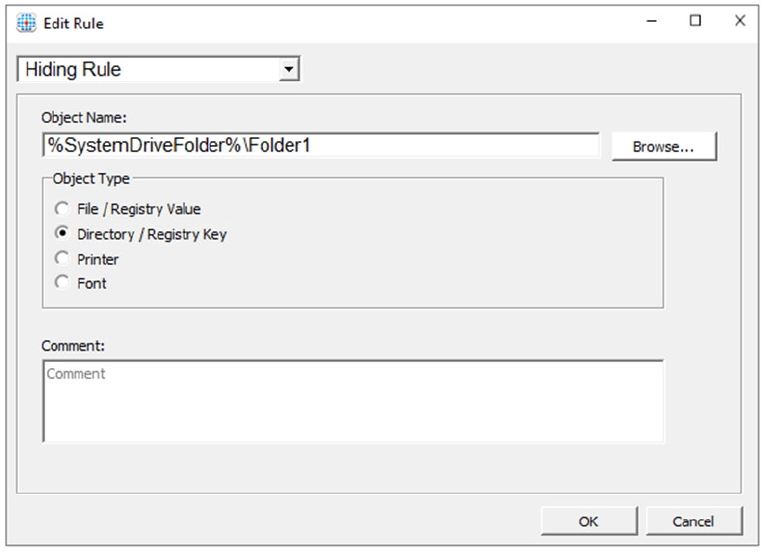
You create assignments for the Application Masking rule as shown in the following exhibit.
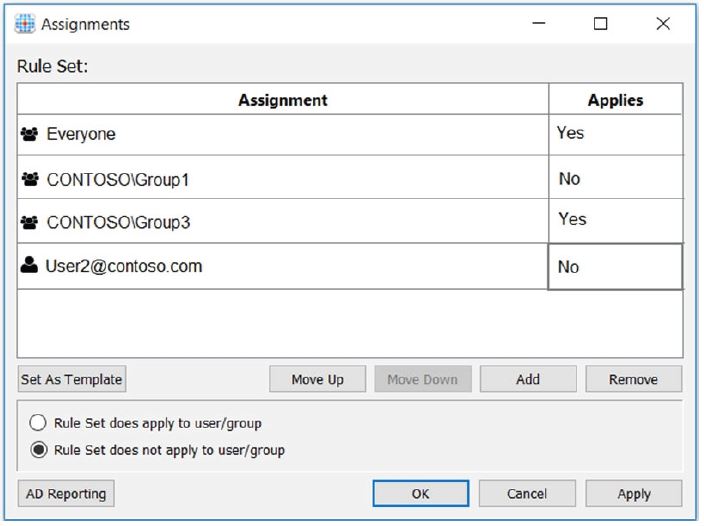
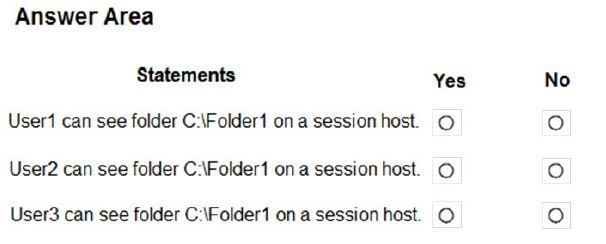
For each of the following statements, select Yes if the statement is true. Otherwise, select No.
NOTE: Each correct selection is worth one point.
Hot Area:
Note: This question is part of a series of questions that present the same scenario. Each question in the series contains a unique solution that might meet the stated goals. Some question sets might have more than one correct solution, while others might not have a correct solution.
After you answer a question in this section, you will NOT be able to return to it. As a result, these questions will not appear in the review screen.
You have the following:
✑ A Microsoft 365 E5 tenant
✑ An on-premises Active Directory domain
✑ A hybrid Azure Active Directory (Azure AD) tenant
✑ An Azure Active Directory Domain Services (Azure AD DS) managed domain
✑ An Azure Virtual Desktop deployment
The Azure Virtual Desktop deployment contains personal desktops that are hybrid joined to the on-premises domain and enrolled in Microsoft Intune.
You need to configure the security settings for the Microsoft Edge browsers on the personal desktops.
Solution: You create and configure a Group Policy Object (GPO) in the on-premises domain.
Does this meet the goal?
Your network contains an on-premises Active Directory domain named contoso.com.
You have an Azure subscription that contains the resources shown in the following table.
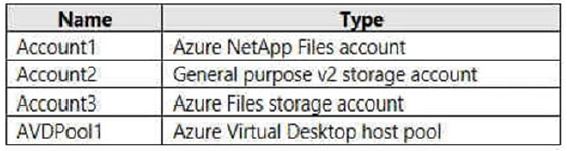
You need to create a share that will host FSLogix profiles for AVDPool1. The solution must meet the following requirements:
* Maximize read and write performance for the profiles.
* Control access to the SMB share by using the users and groups stored in contoso.com.
Which account should you use to host the share?
You have an Azure Virtual Desktop host pool that runs Windows 10 Enterprise multi-session.
You need to configure automatic scaling of the host pool to meet the following requirements:
✑ Distribute new user sessions across all running session hosts.
✑ Automatically start a new session host when concurrent user sessions exceed 30 users per host.
What should you include in the solution?
You have an Azure Virtual Desktop deployment that uses Microsoft 365 cloud services including Microsoft Teams.
Users use the Remote Desktop client to connect to the deployment from computers that run Windows 10.
You need to support audio and video in Azure Virtual Desktop and provide the users with access to Microsoft Teams calling and meeting features.
Which three actions should you perform? Each correct answer presents part of the solution.
NOTE: Each correct selection is worth one point.
Select all that apply
You have an Azure Virtual Desktop deployment.
You implement FSLogix profile containers.
You need to ensure that the FSLogix profile containers are not used for specific users.
What should you do?
Note: This question is part of a series of questions that present the same scenario. Each question in the series contains a unique solution that might meet the stated goals. Some question sets might have more than one correct solution, while others might not have a correct solution.
After you answer a question in this section, you will NOT be able to return to it. As a result, these questions will not appear in the review screen.
You have an Azure Virtual Desktop host pool that runs Windows 10 Enterprise multi-session.
User sessions are load-balanced between the session hosts. Idle session timeout is 30 minutes.
You plan to shut down a session host named Host1 to perform routine maintenance.
You need to prevent new user sessions to Host1 without disconnecting active user sessions.
Solution: From the host pool, you change the Drain mode of Host1.
Does this meet the goal?
Your on-premises network contains 20 Windows 10 devices.
You have an Azure Virtual Desktop deployment.
You need to deploy the Microsoft Remote Desktop client (MSRDC) to the devices. The MSRDC must be available to everyone who sign in to the devices.
What should you do?